SUNFULL / PRODUCT GUIDE

Compare models in a series

Explore model variants side by side. Compare acquisition scope, forwarding protocols and physical ports, then open a model for its full specifications and documents.

Select by requirements

1 matching models · 219 in the catalog

Showing 1–1 of 1
How to choose within a series

How to choose within a series

Match device-side protocols and the host system first, then check ports, wireless connections and capacity. Candidates below use confirmed model specifications.

Current model groupMB1002

You need multiple serial and Ethernet protocols

Check models confirmed to cover all acquisition protocols for serial and Ethernet connections. Check protocol scope and physical port counts separately. Confirm dedicated CAN, KNX TP and 2-wire MBus connections for the specific model.

Confirmed candidates1 models
  • MB1002-ARM-E

    All serial and Ethernet acquisition protocols

    Forwarding: Modbus TCP

View full group specifications

This guidance narrows the candidates. Confirm communication roles, read/write direction, the point list, wiring and model-specific resources before final selection.

“Unconfirmed” means documentation does not establish a value; it does not mean zero or unsupported.


Compare models in a series
ModelDevice acquisition → System forwarding
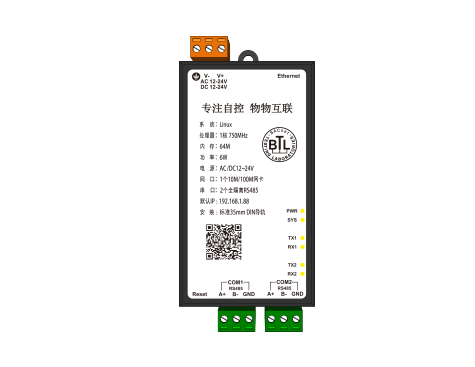
MB1002-ARM-E
01Acquisition scopeDevice side
All acquisition protocols for serial and Ethernet connections
02Forwarding protocolsSystem side
Modbus TCP
Ethernet ports1
Total serial ports2
RS4852
RS232—
CAN ports—
KNX TP ports—
Two-wire MBus ports—
DI channels—
DO channels—
AI channels—
AO channels—
Touchscreen—
Model documentsSpecifications & downloads
MB1002-ARM-E

01Acquisition scopeDevice side

All acquisition protocols for serial and Ethernet connections

02Forwarding protocolsSystem side

Modbus TCP
Ethernet ports
1
Total serial ports
2
RS485
2
RS232
—
CAN ports
—
KNX TP ports
—
Two-wire MBus ports
—
DI channels
—
DO channels
—
AI channels
—
AO channels
—
Touchscreen
—
Specifications & downloads

“—” means the documentation does not establish a value; 0 is a confirmed zero. Check model documentation for shared ports, options and protocol roles.